AI is powerful, but it may not suit every situation. This guide helps you decide where AI can provide real value or if another solution is better.
This stage builds on the business process map you created in Stage 1: Map your processes.

AI is powerful, but it may not suit every situation. This guide helps you decide where AI can provide real value or if another solution is better.
This stage builds on the business process map you created in Stage 1: Map your processes.
Start by understanding what tools are available and what AI can help with. Then match the right tool to the right task in your mapped process.
If you choose the right tool for the right task, you’ll get better results with less rework. Knowing what AI can and can’t do helps you set clear boundaries and avoid surprises later.
Score each pain point from Step 1 using the criteria in Table 1.
Table 1. Criteria for scoring pain points for AI fit
| Criterion | Low score (1) | Medium (2–3) | High score (4–5) |
|---|---|---|---|
| Volume | Happens rarely | Weekly occurrence | Many times a day |
| Repetitiveness | Varies each time | Some patterns | Consistent process |
| Data availability | No digital records | Partial data | Data-rich |
| Error tolerance | Errors are catastrophic | Moderate consequences | Errors are easy to fix |
| Current cost | Low effort or cost | Moderate resources | High effort or cost |
A simple score helps you compare options and quickly rule out ideas that are too risky, too costly, or not ready for your data.
Fill out Table 4 in the business process mapping template.
After mapping the process with her team, Sarah scored each pain point to identify which ones were a good fit for AI.
| Pain point | Volume (1–5) |
Repetitive (1–5) |
Data (1–5) |
Error Tol (1–5) |
Cost (1–5) |
Total score (AI fit) |
|---|---|---|---|---|---|---|
| Custom quote writing | 4 | 4 | 5 | 4 | 3 | 20 |
| Document chasing | 5 | 5 | 4 | 5 | 4 | 23 |
| Document tracking | 5 | 3 | 3 | 4 | 3 | 18 |
| Xero data entry | 4 | 5 | 5 | 3 | 3 | 20 |
| Historical data import | 3 | 3 | 4 | 2 | 5 | 17 |
| Welcome email errors | 4 | 5 | 5 | 4 | 2 | 20 |
Use the matrix in Figure 1 to prioritise each opportunity based on 2 factors:
Business impact means what happens if the outcome is wrong. Treat an opportunity as high impact if it:
If an opportunity has high impact on people, involve the people affected when you redesign the workflow (Step 3).
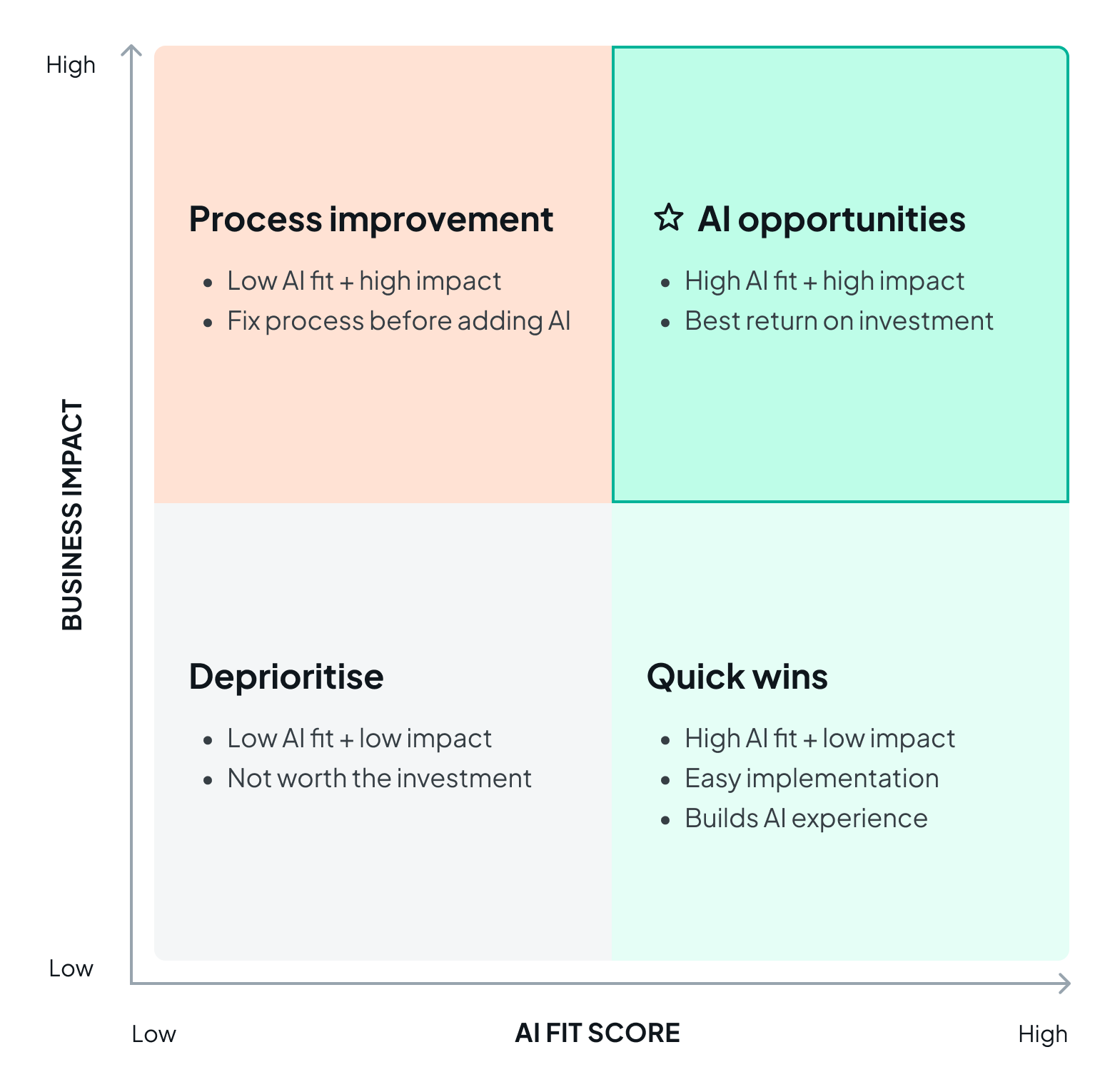
Low AI fit (score 5–12)
High AI fit (score 13–25)
These score ranges are a guide only.
Not everything needs AI. If an opportunity has low fit for AI but high business impact, try simpler options first. For example:
Key rule: If a simpler solution can deliver 80% of the benefit at 20% of the cost or complexity, start there.
Simple fixes are often faster, cheaper and safer than introducing a new tool. They can remove the pain point without adding new risks. They can also help your return on investment.
Set clear boundaries for each opportunity you plan to improve with AI. For example, define:
Clear boundaries prevent scope creep and reduce surprises later. They also make it easier to manage risk and explain how the tool will be used.
Fill out Table 5 and Figure 1 in the business process mapping template.
Sarah used the matrix to group each pain point by priority. For items with low AI fit, she listed simpler ways to fix the issue.
| Priority level | Pain points |
|---|---|
| Priority AI opportunities (high AI fit + high impact) | Document chasing (23), custom quote writing (20), welcome email (20) |
| Quick wins (high AI fit + low impact) | Xero data entry (20) |
| Process improvement first (low AI fit) | Document tracking (18) – try better checklist Historical data import (17) – train a second bookkeeper |
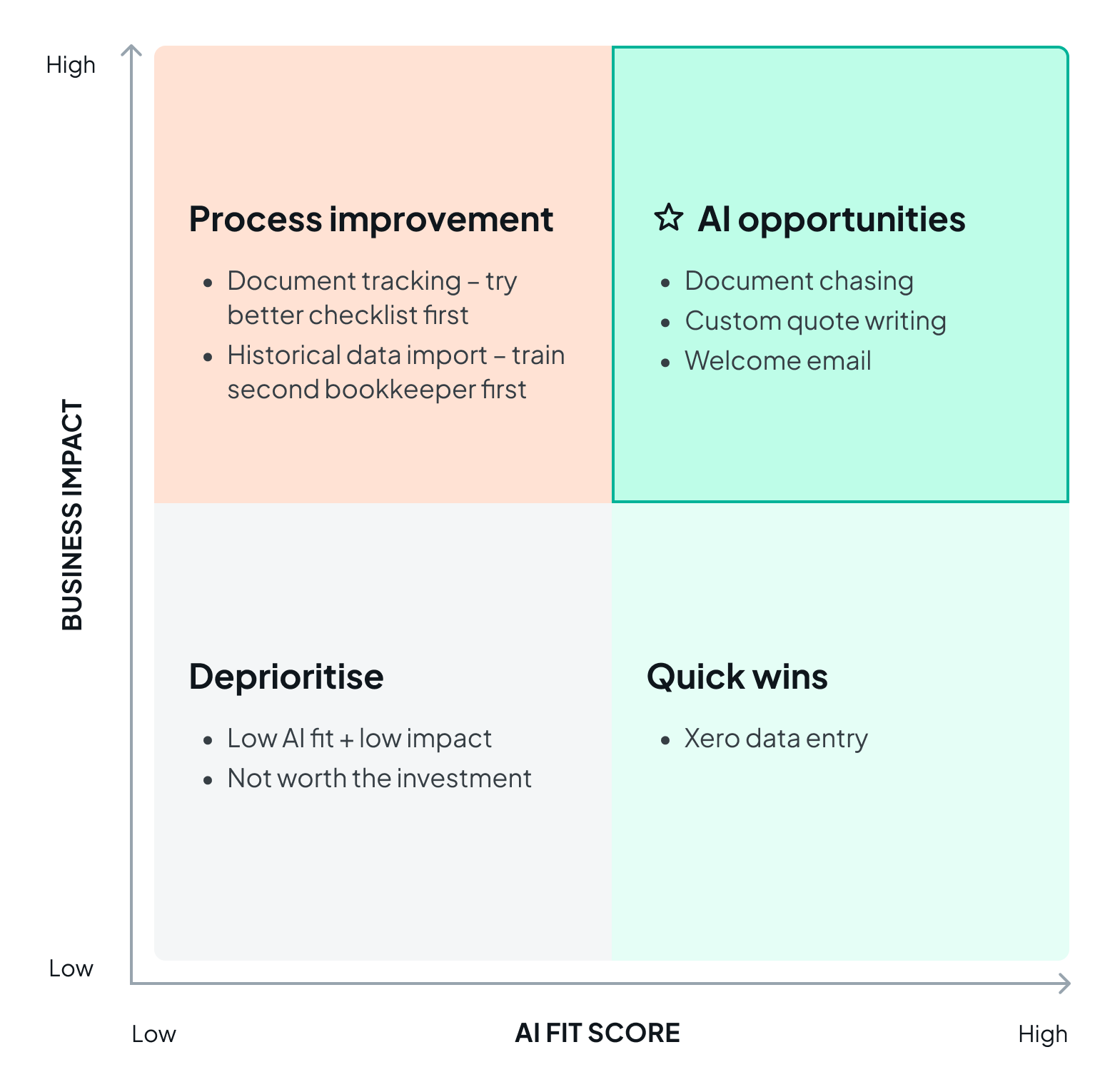
After scoring, Sarah and the team decided to:
Sarah also wrote a short scope statement for each AI use case so the pilot can stay contained.
Use this template across all stages to prepare your business.
You should now know which pain points are good candidates for AI and which are better solved another way. Come back and complete this stage for as many processes as you need.